
The Distro That Made Linux Users Angry
It was not supposed to be the future of computing. It was not presented as a major breakthrough in operating-system design. The humor came from the contrast: a platform associated with technical seriousness, terminal windows, and endless configuration files had been repackaged around a teenage pop star.
But the reaction to it was almost more interesting than the joke itself.
Because for a certain kind of Linux user, Hannah Montana Linux was not merely silly. It was offensive. It violated some unwritten rule about what Linux was supposed to look like and who was supposed to use it.
That is strange when you think about it.
What Hannah Montana Linux Actually Was
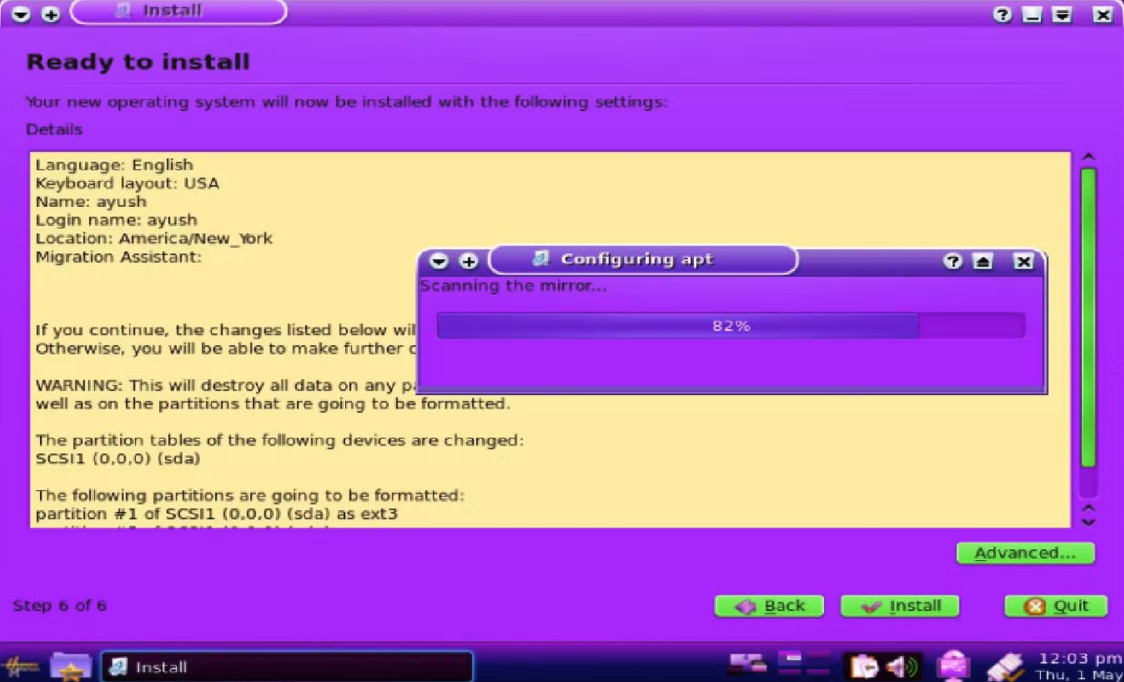
Hannah Montana Linux was a real project hosted on SourceForge, available at hannahmontana.sourceforge.net. It shipped as a live ISO based on Ubuntu 10.04 Lucid Lynx, which was itself a long-term support release built on Debian. The distribution did not invent a new init system, a new kernel patch, or a new filesystem. What it did was take a working Ubuntu base and apply a consistent visual identity across every layer of the desktop.
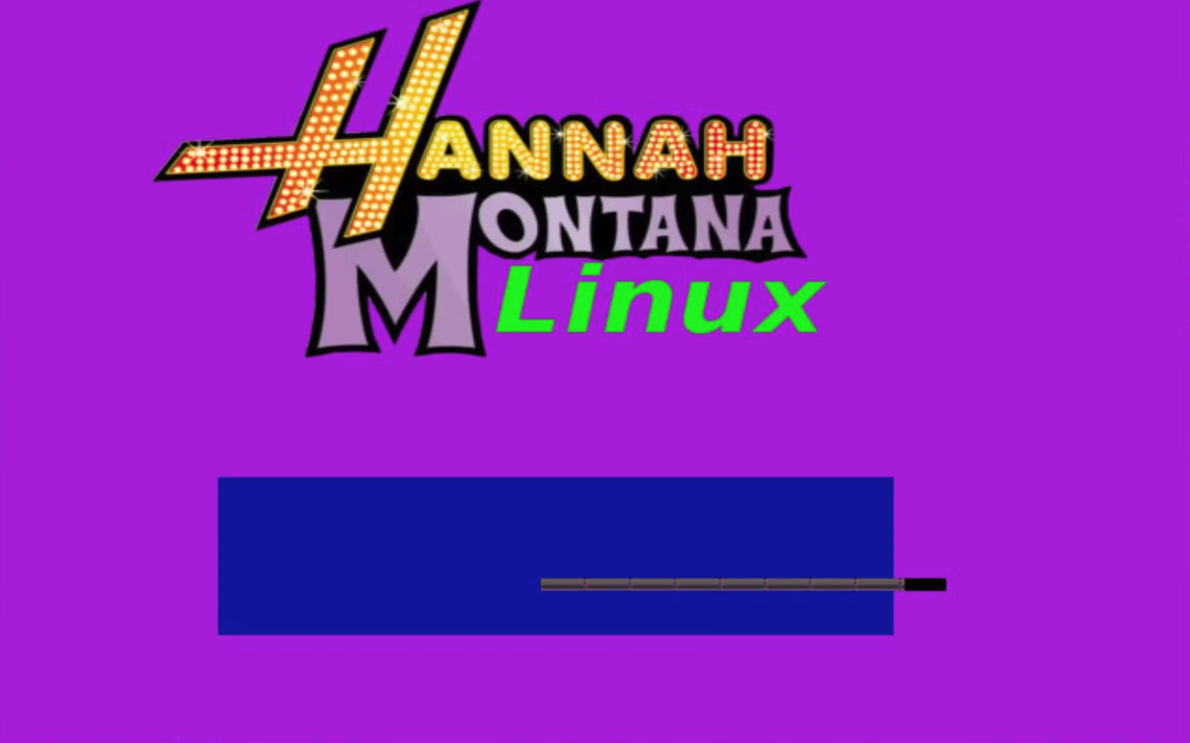
The default wallpaper was a photo-realistic render of Hannah Montana surrounded by stars. The GTK theme replaced Ubuntu's brown and orange defaults with pink and purple gradients. The icon pack swapped the standard GNOME icons for a custom set styled to match. The Plymouth boot splash replaced the standard Ubuntu animation with a branded sequence. The entire effect was unified and intentional, which is more than you can say for a lot of self-proclaimed professional Linux distributions that ship with mismatched icon sets and three different widget styles.
The project was simple enough that understanding it means understanding how any Ubuntu derivative is built. The machinery underneath Hannah Montana Linux is the same machinery underneath Linux Mint, elementary OS, and dozens of other derivatives that ship today.
Hannah Montana Linux — Bottom Panel
The GNOME 2 bottom taskbar as shipped with Hannah Montana Linux. Hover each icon.
Hannah Montana Linux — Desktop Theme Stack
Each layer applied on top of the Ubuntu base. Watch the desktop come alive.
The Foundation: Ubuntu as a Remaster Base
Building your own Hannah Montana Linux, or any themed Ubuntu derivative, starts with choosing a base. Ubuntu 10.04 was the original choice because it was stable, had broad hardware support, and shipped with the GNOME 2 desktop environment, which had a mature and well-documented theming system through GTK 2.
The tool that made this practical was Remastersys. Remastersys was a Bash script that took a running Ubuntu installation, stripped out user-specific data, repackaged the filesystem into a Squashfs archive, and wrapped the whole thing in an ISO that could boot as a live session and install itself onto new hardware. It abstracted away the most tedious parts of ISO creation while leaving the actual system configuration entirely up to the builder.
The process was deliberately linear. You start with a clean Ubuntu install. You customize it until it looks exactly how you want. You run Remastersys. You get an ISO. The ISO you get out is an exact snapshot of the system you configured. What you see on your desktop is what anyone who runs the live session will see.
Modern Ubuntu derivatives use a different toolchain. Cubic, the Custom Ubuntu ISO Creator, and the official ubuntu-image tools have largely replaced Remastersys, which is no longer maintained. But the conceptual model is identical: start from a running system, modify it, capture it, distribute it.
Configuring the GTK Theme
GTK 2 and GTK 3 are the widget toolkits that control how every application window looks: the titlebar, the buttons, the menus, the scrollbars, the entry fields. When you change the GTK theme, you change all of those simultaneously across every application that uses the toolkit.
A GTK 2 theme is a directory placed in /usr/share/themes/ or ~/.themes/. It must contain at minimum a gtk-2.0/ subdirectory with a gtkrc file. The gtkrc file specifies colors, sizes, fonts, and image assets for every widget state: normal, prelight (hover), active (pressed), insensitive (disabled), and selected.
For Hannah Montana Linux, the gtkrc sets the base color to a deep pink, the prelight state to a lighter fuchsia, and uses a star motif PNG for the scrollbar slider. The engine used in most 2010-era Ubuntu themes was Murrine or Clearlooks, both of which allowed gradient fills and rounded corners through the gtkrc without requiring custom drawing code.
style "default" {
  bg[NORMAL]      = "#d946ef"
  bg[PRELIGHT]    = "#e879f9"
  bg[ACTIVE]      = "#a21caf"
  bg[SELECTED]    = "#c026d3"
  bg[INSENSITIVE] = "#4a044e"

  fg[NORMAL]      = "#ffffff"
  fg[PRELIGHT]    = "#ffffff"
  fg[ACTIVE]      = "#ffffff"
  fg[SELECTED]    = "#ffffff"
  fg[INSENSITIVE] = "#9d4edd"

  engine "murrine" {
    roundness       = 4
    gradient_shades = { 1.2, 1.1, 0.9, 0.8 }
    glazestyle      = 1
  }
}

widget_class "*" style "default"
To apply the theme system-wide for all users, you set it in the GDM configuration and in the default user profile. For the live session, this means placing the gconftool-2 invocations in the casper user-setup scripts that run on first boot.
GTK Theme Architecture — What Each File Controls
A complete GTK theme for Hannah Montana Linux touches five independent layers.
Icon Packs and the Hicolor Fallback Chain
Icon themes in GTK follow a specific lookup order defined by the Freedesktop.org Icon Theme Specification. When an application requests an icon, the toolkit checks the current icon theme first, then falls back through a list of parent themes, and finally reaches the built-in Hicolor theme that ships with every GTK installation.
An icon theme directory lives in /usr/share/icons/ or ~/.icons/. It must contain an index.theme file that declares the theme name, its parent themes, and a list of subdirectories organized by icon size and context. The contexts include applications, places, devices, actions, mimetypes, and status.
For a Hannah Montana theme, the most visible icons to replace are the folder icons in the Places context and the application launchers in the Applications context. Replacing every icon in a theme from scratch is weeks of work. The practical approach for a small project is to replace the high-visibility icons and inherit everything else from Tango or Humanity.
[Icon Theme]
Name=HannahMontanaIcons
Comment=Hannah Montana Icon Theme
Example=folder
Inherits=Humanity,Tango,hicolor

Directories=16x16/places,22x22/places,32x32/places,48x48/places,
    16x16/apps,22x22/apps,32x32/apps,48x48/apps

[16x16/places]
Size=16
Context=Places
Type=Threshold
Threshold=2

[48x48/places]
Size=48
Context=Places
Type=Threshold
Threshold=2
Plymouth: The Boot Splash
Plymouth is the program that displays the graphical boot animation between the bootloader handoff and the login screen. It runs early in the boot process, before the display server starts, using kernel mode setting to access the framebuffer directly.
Plymouth themes live in /usr/share/plymouth/themes/. Each theme is a directory containing a .plymouth metadata file and typically a script written in Plymouth's own scripting language. The script controls what gets drawn to the screen and how it animates based on boot progress messages from the kernel.
A minimal Plymouth theme that displays a full-screen background image with a progress bar:
// hannah-montana.script
wallpaper_image = Image("background.png");

wallpaper_sprite = Sprite(wallpaper_image);
wallpaper_sprite.SetX(0);
wallpaper_sprite.SetY(0);
wallpaper_sprite.SetZ(-100);

progress_box_width = 400;
progress_box_height = 16;
progress_box_x = (Window.GetWidth() - progress_box_width) / 2;
progress_box_y = Window.GetHeight() * 0.85;

fun boot_progress_callback(duration, progress) {
  progress_bar.SetWidth(progress_box_width * progress);
}

Plymouth.SetBootProgressFunction(boot_progress_callback);
To make this the active Plymouth theme: sudo update-alternatives --set default.plymouth /usr/share/plymouth/themes/hannah-montana/hannah-montana.plymouth && sudo update-initramfs -u.
The Build Pipeline: From Modified System to ISO
Once the customizations are in place, the ISO creation process compresses the live filesystem into a Squashfs archive and wraps it with an isolinux or GRUB bootloader configuration so the result is bootable from USB or optical media.
Hannah Montana Linux — Build Dependency Graph
All components flow into a single .iso artifact via the Ubiquity remaster pipeline.
The Squashfs step is the most time-consuming. mksquashfs reads every file in the root filesystem, compresses it with XZ compression at maximum ratio, and writes the result to filesystem.squashfs inside the ISO directory structure. A typical Ubuntu 10.04 desktop installation with additional theming assets compresses from around 3.5 GB to 850 MB. XZ compression at the default settings is slow: expect 15 to 30 minutes on hardware from that era.
The ISO structure expects specific directories. The casper/ directory holds filesystem.squashfs, the initrd, and the kernel vmlinuz. The isolinux/ directory holds the BIOS bootloader. The .disk/ directory holds metadata the Ubiquity installer reads to identify the distribution. The MD5 checksum file at the root of the ISO is read by the media verification step in the Ubiquity installer.
ISO Build — genisoimage pipeline
Takes a modified Ubuntu filesystem and produces a bootable .iso ready for USB or CD.
After genisoimage produces the ISO, test it with isohybrid to make the binary writable to a USB stick with dd without a separate tool: isohybrid HannahMontanaLinux.iso. Then sha256sum HannahMontanaLinux.iso > HannahMontanaLinux.iso.sha256 gives you an integrity file to distribute alongside the image.
Squashfs XZ Compression — Filesystem Size at Each Build Stage (MB)
XZ compression shrinks a 3.7 GB live root to under 900 MB. Each theming layer adds negligible size.
How the Live Session Actually Works: aufs and casper
When someone boots Hannah Montana Linux from a USB stick, they are not running off the stick directly. The ISO contains a read-only Squashfs image. The casper initramfs script locates that image, mounts it, and then creates an aufs union mount that places a writable tmpfs layer on top of it. The kernel sees a single unified filesystem, but every write goes to RAM. Nothing touches the ISO.
This is why the live session can create files, change settings, and install packages without modifying the original media. It is also why everything vanishes on reboot unless you explicitly save a casper-rw persistence file or install to disk.
aufs Overlay Stack — How the Live Session Filesystem Works
The kernel sees one unified filesystem. Reads come from squashfs; writes land in tmpfs and are lost on reboot unless saved to persistent storage.
aufs on / type aufs (rw,relatime,si=8c1ed0c)
The casper boot path runs before the init system. ISOLINUX or GRUB loads the kernel and the casper initrd. The initrd contains the casper scripts, which probe block devices for a volume labeled Ubuntu 10.04 or matching the casper boot parameter. When it finds the ISO, it mounts the squashfs at //filesystem.squashfs, sets up the aufs overlay, and then calls pivot_root to hand off to the real init system on the merged filesystem.
casper live-boot sequence — /dev/sr0 to desktop
The casper initramfs script locates the squashfs on the ISO, mounts it read-only, creates an aufs overlay for writes, and hands off to the init system.
The casper boot parameter on the kernel command line is what triggers this entire path. Without it, the initrd assumes it is booting a standard installed system and looks for a root partition instead. This parameter is set in the isolinux.cfg or grub.cfg baked into the ISO.
# isolinux/isolinux.cfg
default live
label live
  menu label ^Start Hannah Montana Linux
  kernel /casper/vmlinuz
  append  initrd=/casper/initrd.lz boot=casper quiet splash --
The Remaster Checklist
This is the full sequence from a clean Ubuntu install to a distributable ISO. No steps are optional. Skipping the MD5 generation step means the live session's media check will fail and users will assume the download is corrupt.
Remaster Pipeline — 8-Step Checklist
From stock Ubuntu 10.04 to a distributable Hannah Montana Linux ISO using Remastersys.
Distribution: SourceForge, Torrents, and Mirrors
The original Hannah Montana Linux was distributed through SourceForge, which in 2010 was still the dominant platform for hosting open-source project downloads. SourceForge provided a download mirror network, statistics tracking, and a project page at no cost. For a project with no budget and potentially high traffic if it gets written about, this was the correct choice.
The two things that turn a hobby ISO into something that spreads are a stable download URL and an integrity checksum. The URL should never change once published, because every link pointing at it becomes invalid if you restructure the directory. The checksum lets users verify they got the same file that was published, which matters when mirrors get out of sync or download corruption occurs on unreliable connections.
Modern alternatives to SourceForge for distributing an ISO include GitHub Releases for files up to 2 GB, Cloudflare R2 for larger files with egress-free bandwidth, and Archive.org, which accepts open-source software uploads and hosts them permanently with automatic torrent generation. Archive.org is underused for this purpose and has the advantage that even if your project is abandoned, the files remain accessible indefinitely.
Memory Management in the 2.6.32 Kernel
Hannah Montana Linux shipped with the Linux 2.6.32 kernel, which was the long-term stable kernel for Ubuntu 10.04. Understanding how that kernel manages memory is not optional context. In a live session where the entire root filesystem lives in RAM, memory management is the session. Run out of physical memory and the OOM killer starts terminating processes. Know how the kernel allocates and reclaims pages and you understand why the live session feels fast at first and sluggish after twenty minutes of use.
The kernel divides physical memory into zones: ZONEDMA for devices that require low addresses, ZONENORMAL for the main allocation pool, and ZONEHIGHMEM on 32-bit systems for memory above 896 MB that cannot be directly mapped into kernel virtual address space. Hannah Montana Linux was a 32-bit distribution. A machine with 2 GB of RAM would have had nearly half of it in ZONEHIGHMEM, accessible only through temporary kernel mappings called kmap.
The buddy allocator manages physical page frames in power-of-two blocks from order 0 (one page, 4 KB) through order 10 (1024 pages, 4 MB). When a process requests memory, the kernel finds the smallest available block that satisfies the request and splits it if needed. Released blocks are coalesced back with their buddies to reduce fragmentation. The slab allocator sits on top of the buddy system and manages fixed-size caches for frequently allocated kernel objects: inodes, dentries, task structs, file descriptors.
In the live session, the page cache is the dominant consumer. Every block read from the squashfs image is stored in the page cache so that subsequent reads of the same data are served from RAM. This is why boot is the most memory-intensive phase: the kernel is populating the page cache from a cold start while simultaneously running the init system, udev, and the GNOME 2 startup sequence.
Memory Region Utilization — Live Session Boot (% of region capacity)
Page cache fills fastest as casper reads squashfs blocks. tmpfs overlay stays small — user writes are sparse.
The tmpfs overlay occupies anon pages rather than the page cache. Anonymous memory is not backed by any file on disk, which means it cannot be reclaimed by dropping cached pages. Under memory pressure the kernel can swap anon pages to a swap partition, but Hannah Montana Linux's live session typically ran without a swap partition on the boot media. When physical memory exhausts, kswapd attempts reclaim by dropping clean page cache pages. If reclaim fails to produce enough free pages, the OOM killer selects a victim process based on a badness score that weighs RSS, swap usage, and time since last CPU activity.
Memory Consumption + Page Fault Rate — Live Session Boot (0–60s)
Stacked areas show MB consumed per region (left axis). Line shows page faults/sec (right axis) — peaks at GNOME 2 startup, settles as page cache warms.
Concurrency Synchronization in aufs and the VFS
The version of aufs bundled with Ubuntu 10.04 implements its own locking on top of the VFS layer. Every directory in the union mount has an associated aufs_dinfo structure protected by an rwsem (read-write semaphore). Multiple readers can hold the semaphore simultaneously. A writer must acquire it exclusively, blocking all readers. This design allows concurrent file reads across the union — the common case in a live session — while serializing the rarer write operations that modify the overlay.
Below aufs, the VFS itself serializes access to inodes with inode->i_mutex, a standard mutex. In 2.6.32 this was implemented as a struct mutex backed by a spinlock and a wait queue. The spinlock protects the mutex state (unlocked, locked, locked with waiters). If a thread tries to acquire a locked mutex, it adds itself to the wait queue and calls schedule(), yielding the CPU. The scheduler wakes it when the mutex holder releases it.
The mmapsem (renamed mmaplock in 5.8) is a per-process rwsem that protects the virtual memory area list. Every mmap(), munmap(), page fault, and /proc/PID/maps read takes at least a read lock on mmapsem. Writers — operations that add or remove VMAs — take an exclusive lock. In a GNOME 2 session, mmapsem contention is visible whenever the window manager, panel, and application all fault in shared libraries simultaneously during startup.
RCU (Read-Copy-Update) handles the structures that are read far more often than they are written: the VFS dcache, the network routing table, process credentials. RCU readers proceed without any lock acquisition. Writers create a new copy of the structure, atomically replace the pointer, and then wait for a quiescent period — one full scheduler tick where every CPU has passed through a context switch — before freeing the old copy. In 2.6.32 this quiescent detection was synchronous via synchronizercu(). The callrcu() asynchronous variant queued the free operation as a callback for after the grace period.
Lock Contention Profile — Acquisition Latency vs. Hold Duration (μs)
aufs_rwsem and mmap_sem dominate hold time. rcu_read_lock is nearly free. Each point is one observed lock event during casper + GNOME 2 init.
The scatter plot above shows the practical consequence of this design. RCU read locks cluster near the origin: acquisition is essentially free and hold times are measured in tens of microseconds. vfsinodemutex events are short-held for simple metadata operations. aufsrwsem holds longer because the union mount must check both the upper tmpfs layer and the lower squashfs layer before returning a result. mmapsem write events are the outliers in the upper right: exclusive VMA modifications under startup load hold the semaphore for milliseconds while every page fault on every other thread of every other process waits.
What Makes a Distro Real
A Linux distribution becomes real the moment someone else can install it on hardware they own and it works. Hannah Montana Linux crossed that line. The theming was intentional. The ISO was functional. The installer ran correctly. People actually used it.
The lesson from this project is not about pop culture or novelty. It is about the nature of the tool. Ubuntu's remastering infrastructure was designed to make derivative distributions possible and relatively straightforward to produce. That infrastructure is open. It is documented. It has not been locked behind a license or a certification process. Anyone with curiosity, a weekend, and the ability to follow documentation can use it to produce a distribution that reflects exactly what they think a Linux desktop should look like.
The people who built Hannah Montana Linux understood that. The people who criticized it were proving the point by accident. A tool that lets you make Hannah Montana Linux also lets you make anything else you can imagine. That is what free software looks like in practice.