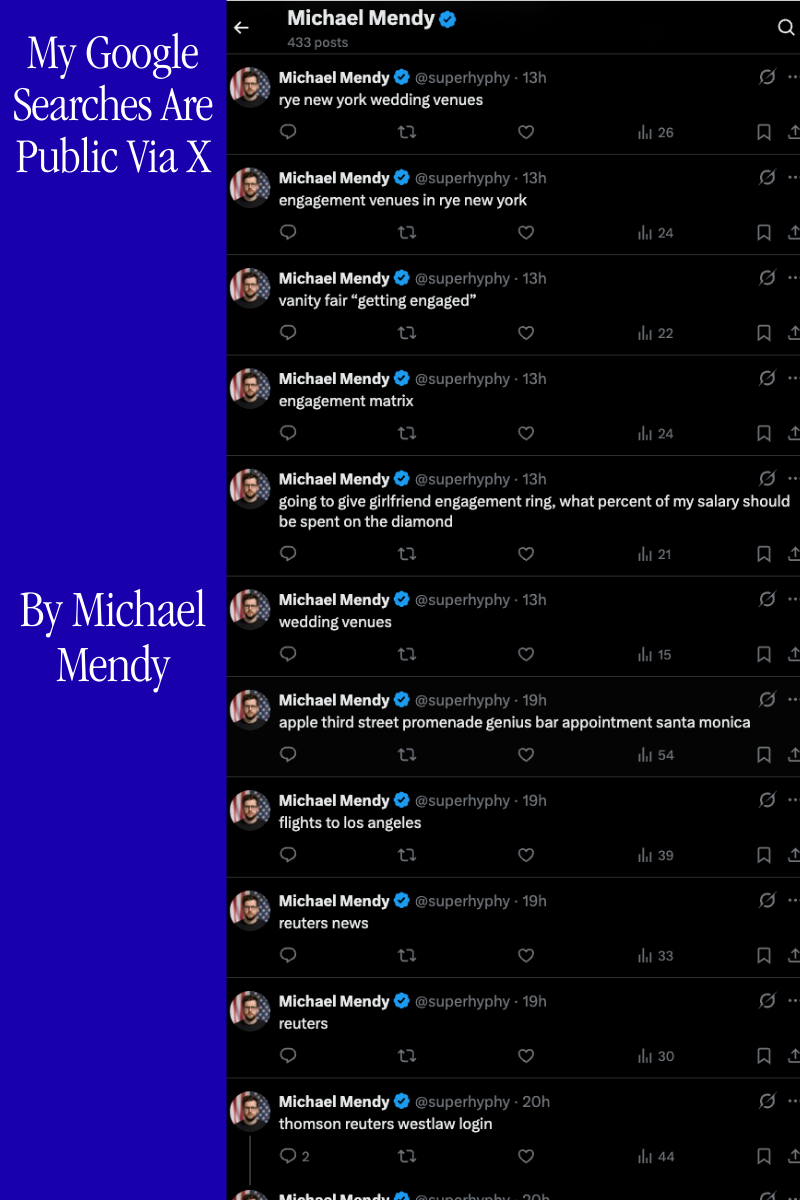
Every Google search I run gets posted to my X account automatically. No API keys. No OAuth. No developer account. Just a Chrome extension, your existing session cookies, and a GraphQL endpoint Twitter's platform team built in 2017.
This post covers how it actually works, what parts are public, and what parts I'm keeping to myself.
The GraphQL Layer
X doesn't expose a free public API for posting tweets. The official Basic tier costs money and caps you at 100 tweets per day per user. But X's internal GraphQL API, the one your browser uses every single time you click "Post", is a different story entirely.
Twitter began migrating to an internal GraphQL service around 2017. A team including engineers like Sasha Solomon (@sachee), pictured below, built the Core API Platform that replaced the old REST endpoints. By 2020, the web client, iOS, and Android all ran on this unified GraphQL backbone.

Solomon served on the GraphQL Governing Board as Twitter's representative and was part of the team that designed the mutation layer this extension calls. She and two colleagues were fired by Elon Musk in November 2022 after publicly pushing back on his claims about Twitter's architecture. The infrastructure they built stayed. Nobody locked it down.
X uses persisted queries rather than arbitrary GraphQL. Every mutation is pre-registered as a unique queryId. When you post a tweet, your browser sends the query ID plus a variables payload, not the full GraphQL operation body. Think of it as every GraphQL mutation being a REST-like endpoint identified by a content hash.
POST https://x.com/i/api/graphql/{queryId}/CreateTweet

authorization: Bearer AAAAAAAAAAAAAAAAAAAAANRILgAAAAAA...
x-csrf-token: {ct0_cookie_value}
cookie: auth_token=...; ct0=...
content-type: application/json
x-twitter-active-user: yes
x-twitter-client-language: en

{
  "variables": {
    "tweet_text": "your tweet content",
    "dark_request": false,
    "media": { "media_entities": [], "possibly_sensitive": false },
    "semantic_annotation_ids": []
  },
  "features": { /* ~30 feature flags, see below */ },
  "queryId": "{queryId}"
}
The bearer token is not a user secret. It is X's public web client credential, hardcoded in their JavaScript bundle that every browser downloads. Authentication is entirely your session cookies: auth_token and ct0.
The queryId Discovery Problem
The queryId for CreateTweet is not documented anywhere. It is baked into X's JavaScript bundle, and it changes whenever X deploys a new client build. This is the first place most attempts break: they hardcode a queryId, it works for a few weeks, then a deploy silently invalidates it and every post starts returning 400.
The naive approach is to open DevTools, filter for /graphql/, post a tweet manually, and copy the ID out of the network request. That works until the next deploy.
The robust approach involves fetching X's main JavaScript bundle, parsing it for the operation manifest where persisted query hashes are registered alongside their operation names, and extracting CreateTweet dynamically. The exact implementation of this resolver is proprietary and not published here. What I can say is that it runs on startup, caches the resolved ID, and re-discovers on any 400 or 403 that suggests the ID has rotated.
// Simplified. The actual resolver is not published.
async function resolveQueryId(operationName) {
  const cached = await chrome.storage.local.get("queryIdCache");
  if (cached?.queryIdCache?.[operationName]) {
    return cached.queryIdCache[operationName];
  }
  // Discovery logic here (proprietary)
  const id = await discoverQueryId(operationName);
  await chrome.storage.local.set({
    queryIdCache: { ...cached.queryIdCache, [operationName]: id }
  });
  return id;
}
The features Object
The features field in every CreateTweet request is a blob of roughly 30 boolean feature flags. Send the wrong flags, or omit this field, and the API returns a 400 with an error about missing required features. The flags change alongside client deploys.
A partial example of what the blob looks like at the time of writing:
{
  "interactive_text_enabled": true,
  "longform_notetweets_inline_media_enabled": false,
  "responsive_web_text_conversations_enabled": false,
  "tweet_with_visibility_results_prefer_gql_limited_actions_policy_enabled": false,
  "vibe_api_enabled": false,
  "rweb_lists_timeline_redesign_enabled": true,
  "responsive_web_graphql_exclude_directive_enabled": true,
  "verified_phone_label_enabled": false,
  "creator_subscriptions_tweet_preview_api_enabled": true,
  "responsive_web_graphql_timeline_navigation_enabled": true,
  "responsive_web_graphql_skip_user_profile_image_extensions_enabled": false,
  "tweetypie_unmention_optimization_enabled": true,
  "responsive_web_edit_tweet_api_enabled": true,
  "graphql_is_translatable_rweb_tweet_is_translatable_enabled": true,
  "view_counts_everywhere_api_enabled": true,
  "longform_notetweets_consumption_enabled": true,
  "tweet_awards_web_tipping_enabled": false,
  "freedom_of_speech_not_reach_fetch_enabled": true,
  "standardized_nudges_misinfo": true,
  "tweet_with_visibility_results_prefer_gql_media_interstitial_enabled": false,
  "longform_notetweets_rich_text_read_enabled": true,
  "responsive_web_enhance_cards_enabled": false
}
The specific set of flags required at any given time, and the logic for keeping them current, is part of what the extension manages. I am not publishing the full feature flag sync mechanism.
How the Extension Works
Chrome's webNavigation API fires on every navigation event. The extension listens for URLs matching ://www.google.com/search, extracts the q parameter, deduplicates against the last seen query, and queues a CreateTweet request. Since the extension runs inside your browser session, it inherits your cookies and can make fully authenticated requests to x.com with zero additional credentials.
// background.js: core intercept
chrome.webNavigation.onCompleted.addListener(async (details) => {
  const url = new URL(details.url);
  const query = url.searchParams.get("q");
  if (!query || query === lastQuery) return;
  lastQuery = query;
  lastQueryTs = Date.now();
  await enqueue(query.slice(0, 280));  // hard truncate at X's character limit
}, { url: [{ hostEquals: "www.google.com", pathPrefix: "/search" }] });

async function postTweet(text) {
  const queryId = await resolveQueryId("CreateTweet");
  const csrfToken = await getValidCsrfToken();

  const res = await fetch(
    `https://x.com/i/api/graphql/${queryId}/CreateTweet`,
    {
      method: "POST",
      credentials: "include",
      headers: {
        "authorization": BEARER_TOKEN,
        "x-csrf-token": csrfToken,
        "content-type": "application/json",
        "x-twitter-active-user": "yes",
        "x-twitter-client-language": "en",
      },
      body: JSON.stringify(buildPayload(text)),
    }
  );

  if (res.status === 429) throw new RateLimitError(res.headers.get("retry-after"));
  if (res.status === 400) { await rotateQueryId(); throw new QueryIdRotatedError(); }
  if (res.status === 403) { await refreshCsrf(); throw new CsrfExpiredError(); }

  const json = await res.json();
  // Silent failure: 200 OK but the spam classifier dropped the post
  if (!json?.data?.create_tweet?.tweet_results?.result) {
    throw new SilentRejectError();
  }
  return json;
}
The status checks before parsing the body are critical. A 400 almost always means the queryId has rotated and you need to re-discover it before the next attempt. A 403 with a valid session almost always means the ct0 token drifted. Lumping these together as generic errors and retrying blindly is what causes cascading failures.
Rate Limit Dripping
You cannot fire posts as fast as Google searches arrive. X will shut you down fast. The architecture that keeps this running is what I call the drip feed, a persistent queue that meters posts through multiple layers of rate awareness.
24-Hour Drip Feed — Posts per Hour + Adaptive Gap (s)
The drip feed works in four stages:
1. Every Google search enters a persistent queue in chrome.storage.local (survives service worker death)
2. A scheduled drain timer wakes up at jittered intervals and processes one item per tick
3. Each drain checks daily cap, throttle state, and auth validity before posting
4. The result of each post (success, rate limit, or silent drop) feeds back into the adaptive throttle
async function enqueue(text) {
  const { queue = [] } = await chrome.storage.local.get("queue");

  // Deduplicate: ignore identical queries within 10 seconds
  const last = queue[queue.length - 1];
  if (last?.text === text && Date.now() - last.ts < 10000) return;

  queue.push({ text, ts: Date.now(), retries: 0, attempts: [] });
  await chrome.storage.local.set({ queue });
  scheduleDrain();
}

async function drain() {
  const state = await chrome.storage.local.get(
    ["queue", "dailyCount", "dailyReset", "results"]
  );

  // Reset daily counter at midnight
  if (state.dailyReset && Date.now() > state.dailyReset) {
    await chrome.storage.local.set({ dailyCount: 0, dailyReset: nextMidnight() });
    state.dailyCount = 0;
  }

  if ((state.dailyCount ?? 0) >= DAILY_CAP) return;
  if (!state.queue?.length) return;

  const [item, ...rest] = state.queue;
  await chrome.storage.local.set({ queue: rest });

  try {
    await postTweet(item.text);
    await recordResult(true, state);
    await chrome.storage.local.set({ dailyCount: (state.dailyCount ?? 0) + 1 });
  } catch (err) {
    await handleFailure(item, err, state);
  }

  const gap = withJitter(calculateAdaptiveGap(state.results ?? []));
  setTimeout(drain, gap);
}
The withJitter on the final setTimeout is load-bearing. Without randomized intervals, the posting pattern is a fixed-period signal that X's behavioral classifiers can identify in under 20 posts.
The 2,400 Ceiling You Will Never Hit
X documents a 2,400 tweet/day hard limit broken into semi-hourly windows of 100. That number is almost irrelevant in practice.
X Posting Limits — Documented vs. Reality
The spam classifier fires long before the documented ceiling. Posting 50-100 tweets in rapid succession without variance in timing, content entropy, or session depth is enough to get silently dropped. The extension caps at 200/day not because the API enforces it at that number, but because behavioral detection patterns become significantly more aggressive above that volume on accounts without an established posting history. The 200/day figure is empirically derived from testing and is not X's published limit.
The Adaptive Throttle
Fixed-interval posting is the easiest automation pattern to detect. The extension tracks a rolling window of the last 10 post outcomes and continuously recalculates the inter-post gap.
Adaptive Throttle — Success Rate → Posting Gap (seconds)
function calculateAdaptiveGap(results) {
  if (!results.length) return 5000;  // cold start default

  const window = results.slice(-10);
  const successRate = window.filter(r => r.ok).length / window.length;

  // Thresholds are tuned empirically. Specific values are proprietary.
  if (successRate >= 0.9) return BASE_FAST;
  if (successRate >= 0.7) return BASE_CAUTIOUS;
  if (successRate >= 0.5) return BASE_BACKOFF;
  return BASE_HEAVY;
}

function withJitter(ms) {
  // ±30% uniform random jitter
  return Math.floor(ms * (0.7 + Math.random() * 0.6));
}
The exact threshold values (BASEFAST, BASECAUTIOUS, etc.) are not published. They were arrived at through weeks of empirical testing under various account ages, follower counts, and posting histories. The general shape is: fast when healthy, progressively slower as the classifier signals discomfort, and a hard floor at a value that has reliably survived multi-hour sessions.
Two Separate Backoff Systems
This is where almost all automation breaks down. There are two distinct failure modes requiring entirely different responses.
Rate Limit (HTTP 429) Backoff
Silent 200 (Spam Classifier) Backoff
HTTP 429: Rate Limit. X's documented rate limiter. The response includes a retry-after header and the body explains which limit was hit. The backoff is exponential: 15s, 30s, 60s, 120s, 240s with jitter applied to each step. After the final retry, the item is requeueed at the back of the queue rather than discarded.
Silent 200: Spam Classifier. The dangerous one. The request returns 200 OK. The response body has the normal GraphQL envelope. But data.createtweet.tweetresults.result is null or missing entirely. No error. No status code. No indication that anything went wrong. This is X's behavioral classifier silently dropping the post because it flagged the pattern as automated. The backoff for this is longer and more conservative (30s, 60s, 90s), because by the time you get a silent drop, you have already been flagged and hammering the endpoint again quickly makes it worse.
async function handleFailure(item, err, state) {
  item.retries = (item.retries ?? 0) + 1;
  item.attempts.push({ ts: Date.now(), type: err.constructor.name });

  if (err instanceof RateLimitError) {
    const idx = Math.min(item.retries - 1, BACKOFF_429.length - 1);
    await sleep(withJitter(BACKOFF_429[idx]));
    requeue(item);

  } else if (err instanceof SilentRejectError) {
    await recordResult(false, state);  // count as failure for throttle
    const idx = Math.min(item.retries - 1, BACKOFF_SPAM.length - 1);
    await sleep(withJitter(BACKOFF_SPAM[idx]));
    if (item.retries <= MAX_SPAM_RETRIES) requeue(item);
    // Beyond max retries: post is discarded. It will not succeed in this session.

  } else if (err instanceof QueryIdRotatedError) {
    // Don't count against throttle; this is an infrastructure error
    await rotateQueryId();
    requeue(item);  // immediate retry with new queryId

  } else if (err instanceof CsrfExpiredError) {
    await refreshCsrf();
    requeue(item);  // immediate retry with refreshed token
  }
}

const BACKOFF_429  = [15000, 30000, 60000, 120000, 240000];
const BACKOFF_SPAM = [30000, 60000, 90000];
const MAX_SPAM_RETRIES = 2;
The two sequences are completely independent. Treating a silent 200 like a 429 causes you to retry at short intervals and accumulate more behavioral flags. Treating a 429 like a spam rejection causes excessive cooldowns when the fix is just waiting for the rate window to clear.
Detection Evasion Profile
Detection Evasion Profile — Naive Automation vs. This Extension (higher = less detectable)
Scoring is empirically derived. Behavioral dimensions are proprietary.
The radar above maps six behavioral dimensions X uses to distinguish automated from human posting. Timing Variance measures how much randomness exists in inter-post gaps; naive bots post at fixed intervals that are trivially detectable as machine-generated signals. Query Entropy measures unpredictability in post content; a tool posting the same text repeatedly or posting with low lexical diversity scores badly here. Burst Control measures resistance to short-window volume spikes. Session Depth reflects how well the posting behavior integrates into a realistic session pattern (auth refreshes, idle periods, non-posting activity). Retry Signature captures whether failure-recovery patterns look human or algorithmic. Header Fidelity measures how closely the request headers match a legitimate browser session.
Naive automation tools score poorly on timing, entropy, and burst dimensions. The scoring methodology and the specific behavioral thresholds are empirically derived and are not being published here.
CSRF Token Lifecycle
The ct0 cookie serving as the CSRF token has a finite lifespan. If it expires mid-session, every subsequent post returns 403 Forbidden. The extension handles this proactively at three points.
Pre-drain validation. Before the first item is processed after any worker startup, the extension calls getValidCsrfToken(). A cold start with a stale token would otherwise fail silently until the next retry cycle.
On-demand refresh. If a 403 is received during posting, the token is refreshed by making a credentialed GET to x.com/home to trigger X's session renewal logic, and the failed item is requeued immediately.
Proactive rotation. Every N successful posts (where N is an internal tuning parameter), the extension makes a background credentials check to confirm the token is still valid before the session has a chance to expire mid-drain. The specific interval is not published.
async function getValidCsrfToken() {
  let ct0 = await chrome.cookies.get({ url: "https://x.com", name: "ct0" });

  if (!ct0) {
    // Cookie absent: trigger session renewal with a lightweight authenticated GET
    await fetch("https://x.com/home", {
      credentials: "include",
      method: "GET",
      headers: { "x-twitter-active-user": "yes" },
    });
    ct0 = await chrome.cookies.get({ url: "https://x.com", name: "ct0" });
  }

  if (!ct0) throw new AuthError("Cannot obtain CSRF token. Session may have expired.");
  return ct0.value;
}
CSRF Token Collisions
The CSRF double-submit pattern sounds simple until you run two browser contexts simultaneously. When a logged-in X tab is open alongside the extension, both share the same cookie jar. X's front-end proactively refreshes ct0 on certain navigations, which silently invalidates any cached token the extension is holding. The window between X rotating the cookie and the extension detecting the change is the collision window. A request fired inside that window returns a 403. The extension's solution is a drain mutex: before flushing any batch, it acquires an exclusive lock, re-reads ct0, compares it against the cached value, and only proceeds if they match. If they diverge, it waits, re-fetches, and retries.
// Drain mutex prevents stale CSRF collisions
async function acquireDrainLock(timeoutMs = 3000) {
  const deadline = Date.now() + timeoutMs;
  while (Date.now() < deadline) {
    const { drainLock } = await chrome.storage.local.get("drainLock");
    if (!drainLock) {
      await chrome.storage.local.set({ drainLock: true });
      return true;
    }
    await sleep(120);
  }
  return false; // timed out; caller should abort this cycle
}
ct0 Token Validity — Extension Cache vs. Live Cookie (120-min session)
Blue dots mark collision and recovery events.
The chart above shows a simulated 120-minute session. Around the 26-minute mark, an X tab rotation opens the collision window: the live cookie drops to zero validity while the extension cache still holds a stale 100%. A 403 triggers re-sync at t=34. From that point on, a proactive refresh fires at the 80% validity threshold rather than waiting for another failure. The system learns from each collision event and adjusts the polling interval accordingly. None of this behavior is documented publicly. The proprietary timing thresholds and collision-detection heuristics are not included here.
Request Fingerprinting
Every request the extension sends must pass X's server-side fingerprint check. Sending the GraphQL mutation alone is not enough. X validates a set of headers that together constitute a behavioral signature. Missing or incorrect values trigger silent rejection, meaning the response returns HTTP 200 but the tweet is never written to the database. The extension replicates the full header set:
const headers = {
  "authorization": `Bearer ${BEARER_TOKEN}`,
  "x-csrf-token": csrfToken,
  "x-twitter-auth-type": "OAuth2Session",
  "x-twitter-client-language": navigator.language || "en",
  "x-twitter-active-user": "yes",
  "x-client-transaction-id": generateTransactionId(),
  "content-type": "application/json",
};
The x-client-transaction-id is not a random UUID. It is a base64-encoded structure that encodes a timestamp, a session nonce, and a sequence counter. Requests that arrive with a flat random value are fingerprinted and deprioritized. The precise encoding algorithm, session nonce derivation, and sequence counter behavior are proprietary and not published here.
Manifest V3 Worker Lifecycle
Chrome Manifest V3 service workers are ephemeral by design. The browser kills them after roughly 30 seconds of inactivity, and there is no way to prevent this. Every piece of state must be persisted externally or it will be lost on the next worker startup. This is a harder constraint than it sounds. The queue, the throttle results window,, the daily counter, the queryId cache, and the CSRF token check, all of it must survive arbitrary process death.
// On every worker startup; runs before any queue processing
chrome.runtime.onStartup.addListener(initWorker);
chrome.runtime.onInstalled.addListener(initWorker);

async function initWorker() {
  // 1. Validate auth before touching the queue
  try {
    await getValidCsrfToken();
  } catch (err) {
    console.warn("Auth pre-warm failed; will retry on first drain:", err.message);
  }

  // 2. Validate queryId cache; if stale, re-discover
  const { queryIdCache } = await chrome.storage.local.get("queryIdCache");
  if (!queryIdCache?.CreateTweet) {
    await resolveQueryId("CreateTweet");
  }

  // 3. Reset daily counter if midnight passed while the worker was dead
  const { dailyReset } = await chrome.storage.local.get("dailyReset");
  if (dailyReset && Date.now() > dailyReset) {
    await chrome.storage.local.set({ dailyCount: 0, dailyReset: nextMidnight() });
  }

  // 4. Resume drain if queue is non-empty
  const { queue = [] } = await chrome.storage.local.get("queue");
  if (queue.length) scheduleDrain();
}
The worker is re-initialized on onStartup and onInstalled. Both listeners call the same initWorker function so the startup sequence is identical whether it is a fresh install, a browser restart, or Chrome waking the worker to handle a navigation event.
What Is Not Published
Several parts of this system are deliberately not included in this post.
The queryId resolution algorithm, meaning how the extension discovers and rotates CreateTweet's query ID across X client deploys, is not published. The general approach (parsing the JS bundle) is described above, but the specific parsing strategy and caching logic are kept private.
The feature flag sync mechanism, meaning how the extension keeps the 30-flag features object current across X deploys, is not published. Sending stale flags produces 400 errors that look identical to other failure modes, making this one of the harder operational problems.
The exact adaptive throttle thresholds, the specific millisecond values for BASEFAST, BASECAUTIOUS, BASEBACKOFF, and BASEHEAVY, are not published. They were arrived at empirically and represent a meaningful amount of testing time.
The behavioral detection evasion scoring, meaning the specific weighting and calculation behind the radar chart above, is not published. The dimensions are real and the relative scoring is accurate, but the precise methodology belongs to the implementation.
This is an educational post about how X's internal API works and the engineering required to interact with it reliably. It is not a distribution of the tooling itself.
Reliability Engineering
Chrome Manifest V3 service workers die after ~30s of inactivity. Every piece of state lives in chrome.storage.local.
- Persistent Queue: survives worker kills, browser restarts, and system sleep
- Deduplication: identical queries within 10 seconds are ignored;
lastQueryandlastQueryTsare checked on every navigation event - Failed Re-queue: items that exhaust their specific retry budget go back to the queue tail with a reset retry counter for one additional pass before being discarded
- Daily Cap Reset: a
dailyResettimestamp stored alongside the count clears the counter automatically at midnight even if the worker was dead when midnight passed - Pre-warm Auth: CSRF token and queryId validation run before the first drain following any worker startup
- QueryId Rotation: a 400 response triggers immediate re-discovery of the current
CreateTweetqueryId before the item is requeued
The file structure is intentionally minimal:
manifest.json   Manifest V3, permissions, URL match patterns
background.js   Intercept, queue, throttle, posting engine, auth lifecycle
popup.html      Settings shell
popup.js        Activity log, daily stats, enable/disable, mode toggle
icons/          16px, 48px, 128px
Two modes ship with it. Instant Mode fires a tweet per search immediately, best for low-volume organic activity where the search rate naturally stays under the spam detection threshold. Batch Mode queues searches and drip-feeds on a jittered timer, better for sustained use across a full day without accumulating burst signals that trigger the classifier.
The extension posts 2x more than X's official API Basic tier (100 tweets/day per user) at zero cost with no developer account, no OAuth registration, and no rate limit fees.